
This article assumes that you are familiar with the basic operations on purchase orders. This article is useful for Receiver and Supplier roles in a community.
A cross dock order is an order with a final destination in a delivery point, in general a store, but where the supplier or carrier must unload the goods in a warehouse in your supply chain and that internal transport is used to deliver to the endpoint. These goods are not stored in the warehouse, left on the gates or a special cross dock location, and delivered to the final destination by internal transport. A supplier sees this as an order of the final destination, but to deliver at warehouse
Step 1: Go to the 'Orders' section

Step 2: Identify a cross dock order
A cross dock order has a specific icon. The delivery location is the final destination. the cross dock location is only visible in the detail pane.
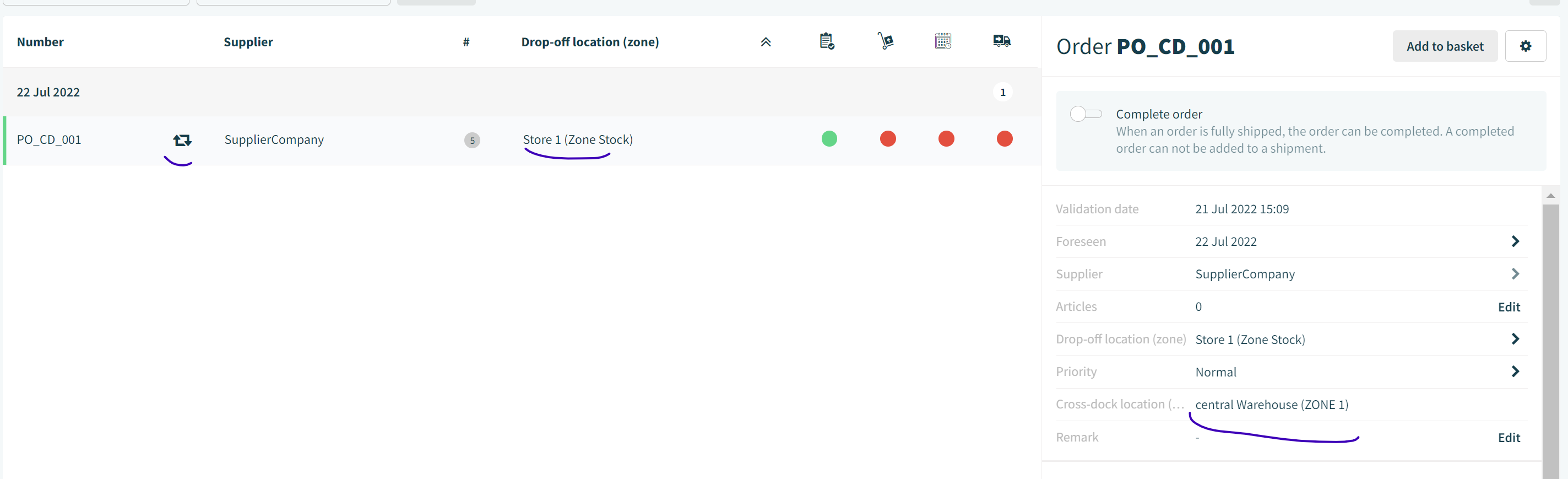
Step 3: Working with a cross dock order
Working with a cross dock order is not that different from a normal purchase order. We just list the difference
- A cross dock order is not visible in the order list of the cross dock location.
- You can place only one cross dock order in the basket to make a package or shipment. The packaging units can not be combined to assure the correct discovery of the cross dock goods
- When a supplier creates a shipment or package, the cross dock location & zone is automatically selected as delivery location. A supplier sees in the order the final destination. But when he book a slot to deliver, the cross dock location and zone is automatically selected
- A carrier does not see any difference. For a carrier it's just a package
- A user of the community owner with limited view on the supply chain tree, can be limited in consulting the data. If this user does not have access to the location where goods will be unloaded by supplier, this user can not access the shipment.
Comments
0 comments
Please sign in to leave a comment.